Blog post
Put AI to work engaging customers in more places: What's new in Microsoft Advertising this November

Show up in more places
Holiday shoppers are looking for gift ideas in new places. Most plan to use conversational AI to help, including 76% in the US, 74% in Australia, and 70% in the UK.1 Many also browse visual boards, scroll curated feeds, and play games. Here are 4 new ways to reach them, mainly through campaigns you already run:
- Show up next to more intent-rich, AI-powered answers with ads in AI Overviews on Bing
- Stand out in a new premium, AI-curated feed with Discover
- Get full-screen attention before gameplay with Xbox Video for Brands
Show up next to AI-powered answers with ads in AI Overviews on Bing
Search is changing from a list of links to a faster path to an answer. AI Overviews on Bing pull information from across the web into a clear summary. That helps people easily explore a topic and decide what to do next. Those answers often reveal needs beyond the exact words someone typed. Each one is a new chance to offer a useful product, service, or next step.
Ads in AI Overviews on Bing are the latest step in bringing ads to AI experiences, building on ads in Copilot. Together, they help you reach people where they discover and decide. And these moments lead to action: Microsoft data shows a 21% increase in purchases after a Copilot interaction.2
Your ads can now show up next to AI-powered answers on Bing when your offers are relevant. For example, say someone asks Bing about taking a trip to Snowdonia National Park. The AI Overview might show a sample itinerary and travel tips. If you provide hotel accommodations, your ad can appear right next to that answer.
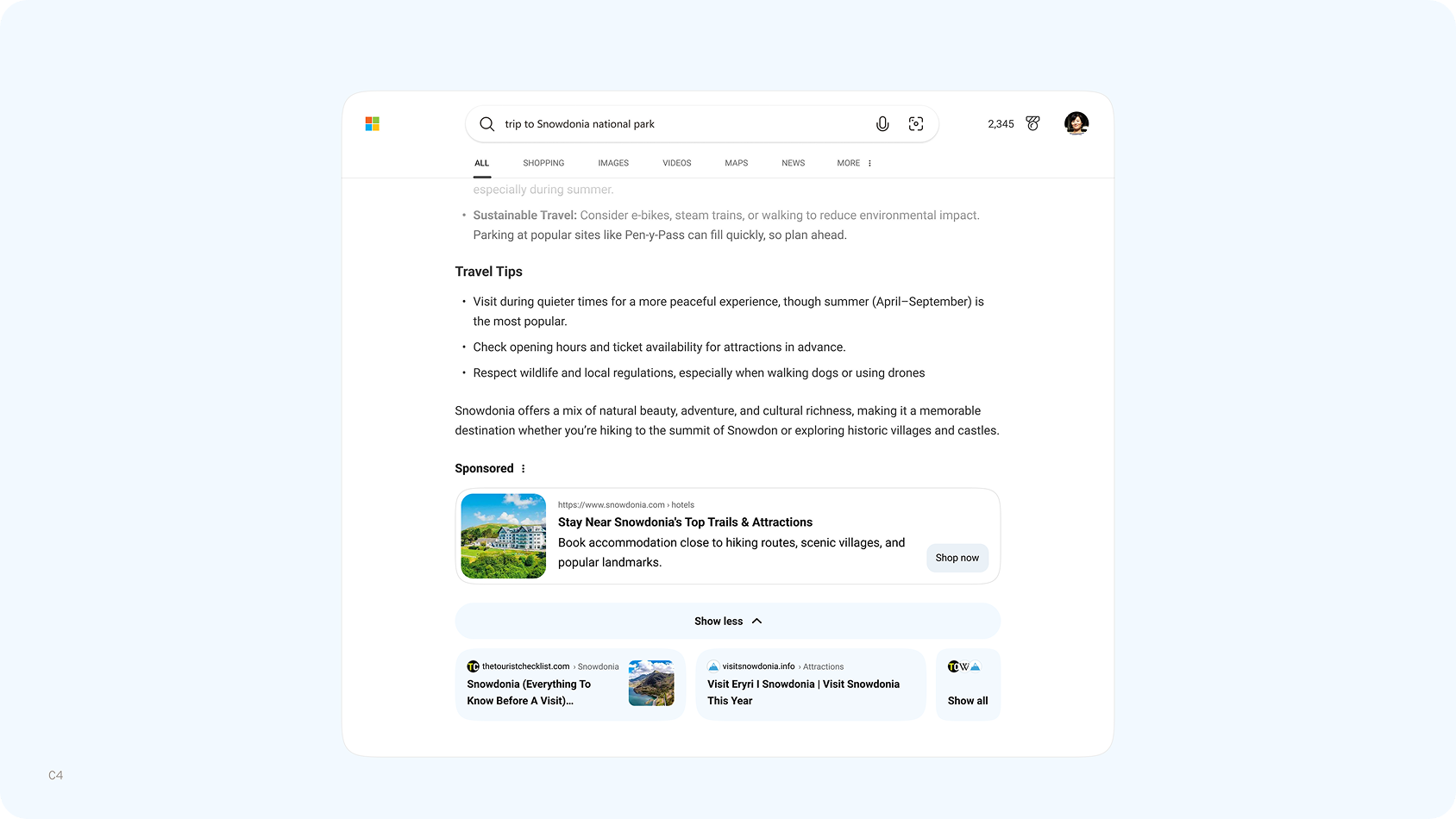
Ads in AI Overviews on Bing
There’s no separate campaign set-up required. Ads in AI Overviews run through the campaigns you already use, including Performance Max and AI Max, which are the most effective way to show up in AI experiences in more relevant ways. As people move from questions to decisions, your brand gets another chance to help at the moment it matters. Ads in AI Overviews are now available in all markets except China.
Stand out in a new premium, AI-curated feed with Discover
Great ideas can start in Bing. They can also come from a story you didn’t know you needed to read – or a video that makes you stop and watch. Meet Discover, Microsoft’s new, AI-powered content feed on the Microsoft Edge desktop new tab page and Windows.
Before, stories competed for attention in a crowded feed. Now, Discover clears the clutter and puts discovery first, making it easier to find something worth your time. A cleaner, more visual feed organizes content into three distinct zones: catch up on what’s happening, explore editor-picked stories, and dive into your interests – with AI making the mix more personal. Richer video and galleries bring those stories to life.
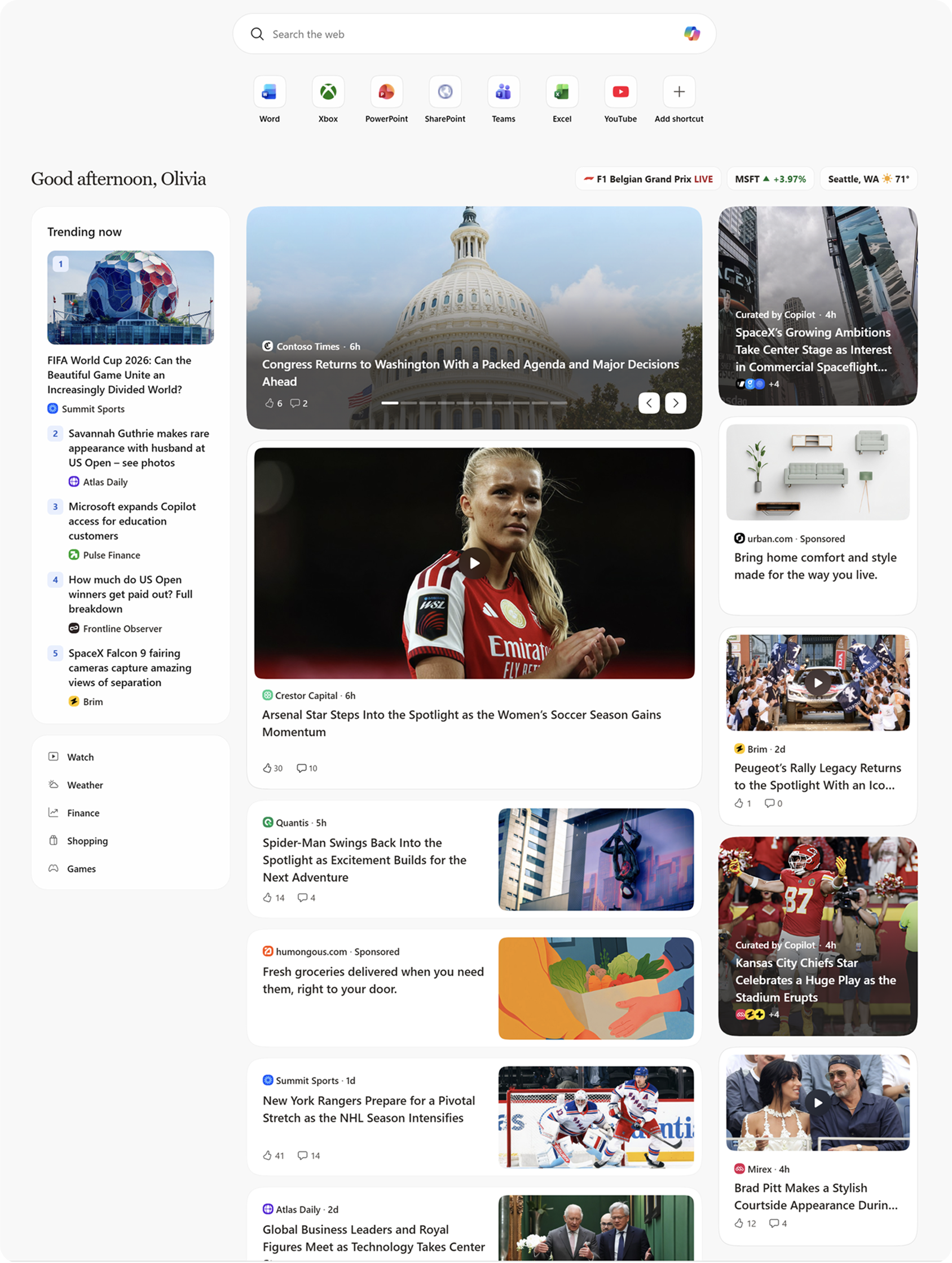
Discover is Microsoft's next generation content feed
Behind that experience are trusted publishers and a network of more than 3,500 creators. Together, they pair the depth of journalism with the personality of creator storytelling, offering different perspective and more reasons to explore.
For your brand, less clutter means more room to stand out. Compared with the classic MSN experience, Discover shows 35% fewer ads per page.3 Early results are promising. Ads in Discover see 35%3 higher viewability and 8-12%3 higher click-through rates.
Discover is live in the US, Canada, UK, Australia and India. Ready to put your brand in the picture? Talk to your Microsoft Advertising account team to learn more.
Get full-screen attention before gameplay with Xbox Video for Brands
Feeds aren't the only place people spend their downtime. Earlier this month, we introduced XBOX Video for Brands. It extends your premium video strategy into gaming at a moment when players are leaned in and paying attention. Full-screen, non-skippable video ads play right before a cloud-gaming session and help eligible players unlock access, while leaving active gameplay uninterrupted.
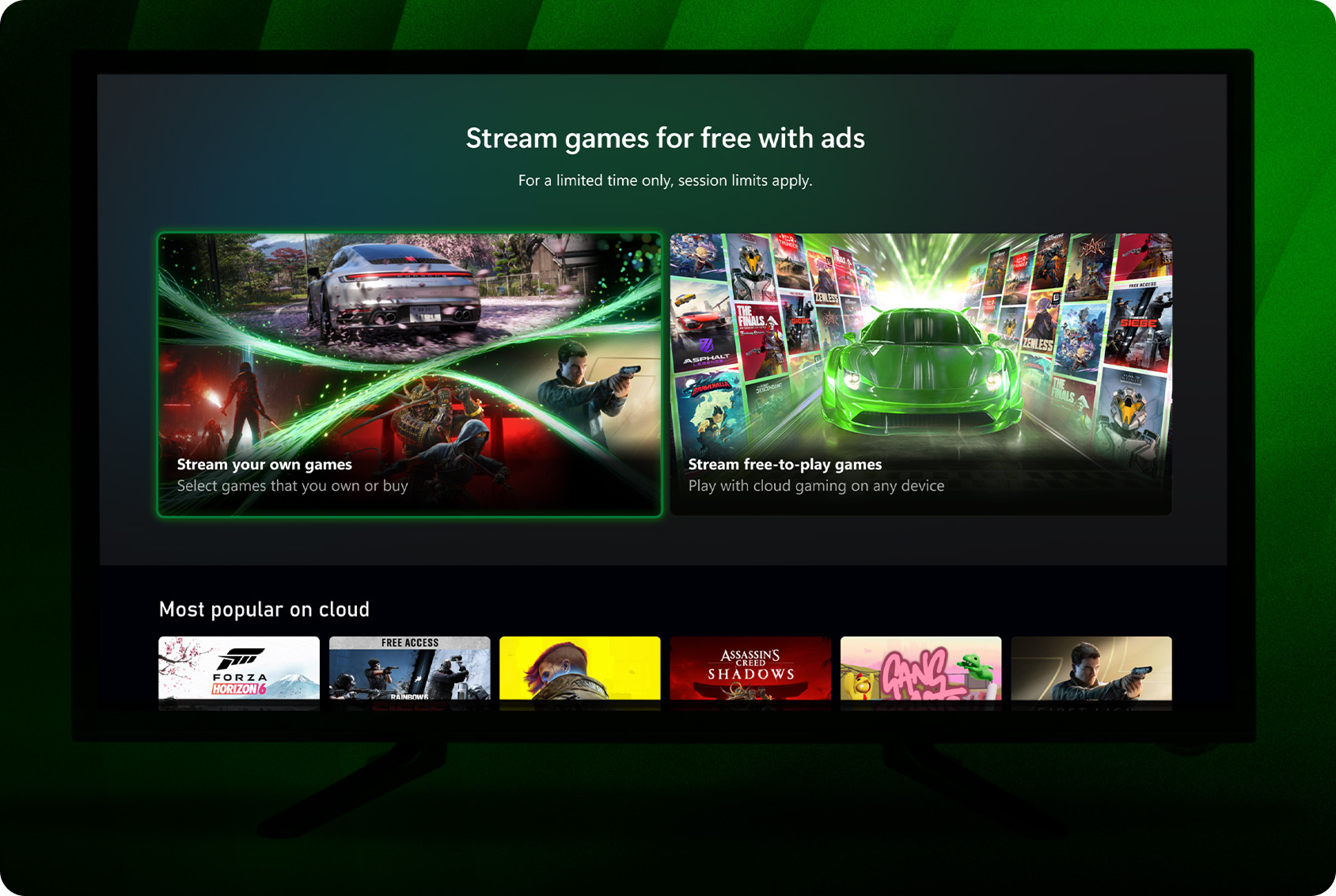
XBOX Video for Brands
Already investing in premium video or connected TV? XBOX Video for Brands is a simple way to reach the XBOX gaming audience with video creative you already have. Already advertising with XBOX? It's another way to get closer to the moment of play, with ads that help players access the games they love. Read the full announcement.
Put AI to Work
AI can help you reach more people and get more from your ads. It works best when you can steer it and see what it's doing. Here's what's new:
- Steer AI Max to the right pages with new URL inclusion controls
- Build trust with clear labels on AI-generated images and videos
- Ask your AI assistant what's working using the Microsoft Advertising MCP server
Steer AI Max to the right pages with new URL inclusion controls
Automated campaigns like AI Max are the best way to future-proof your campaigns ads in AI experiences on surfaces like AI Overviews. However, automation only works when you can steer it and see how it’s working. That's why we've been committed to bringing you the controls and transparency you need to guide AI Max for Search campaigns right from the start.
Last month, we added messaging guidelines. They let you use plain language instructions to keep AI-generated ad copy on-brand and on-message. This month, we're adding URL inclusions to final URL expansion. URL inclusions help you specify the parts of your website that you want AI Max to use – both as a traffic destination as well as a resource to draw from for text customization and search term matching. This makes it even easier for you to tailor your AI Max campaigns to the intent you're looking for and the messaging you want potential customers to see. For example, say you run a home goods store and want holiday shoppers to land on your gift guides. Add your gift guide pages as URL inclusions to your holiday campaigns. AI Max can send relevant traffic there and pull ad text from those pages. URL inclusions are rolling out now.
Build trust with clear labels on AI-generated images and videos
As AI helps you show in more places, it’s also critical to maintain trust wherever you appear and be open about when assets are AI-generated. Governments are also passing laws that may require labels on some AI-generated content. AI content transparency controls are now generally available in Microsoft Advertising. They help you declare AI-generated image and video content and manage visible labels across supported ad formats.
With these new controls, you can:
- Declare AI-generated image and video content: Mark whether an image or video includes AI-generated content. Then choose a visible watermark, where supported.
- Manage declarations at scale: Update one assets or many in the Ads Studio Library. You can also use the Microsoft Advertising APIs and product feeds.
- Check Microsoft's AI detection signals: Use them as a helpful reference for supported assets. You still decide on, and remain responsible for, your own declarations.
These controls work across Product Ads, Multimedia Ads, Audience Ads, Display Ads, Video Ads, and assets in Performance Max campaigns. Available controls may vary by ad format and workflow. Watermark size and placement can vary by ad format, placement, and serving environment.
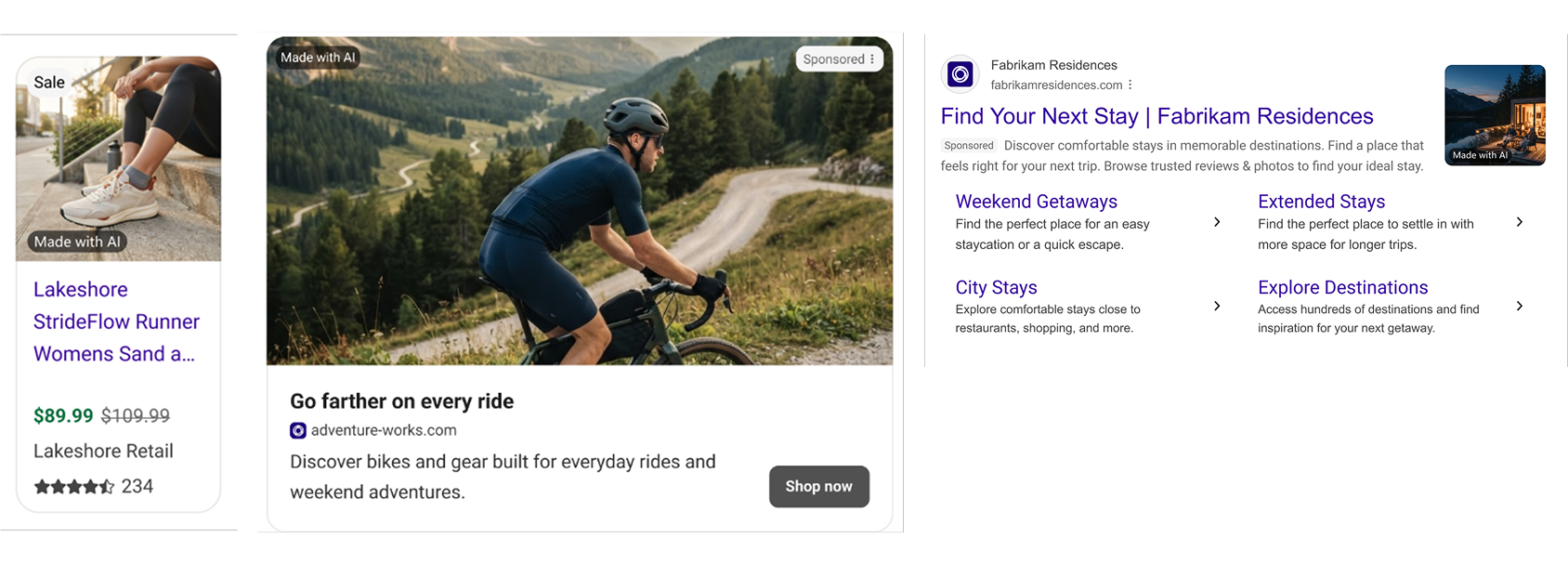
AI labels in Product Ads, Multimedia Ads, and Text Ads with Image Extensions
You're still responsible for making sure your ads follow local laws and disclosure rules, including deciding whether your content needs a AI label. To learn more, visit our AI content transparency Help documentation and Microsoft Advertising API documentation.
Ask your AI assistant what’s working using the Microsoft Advertising MCP server
With your ads in more places and formats, understanding what’s working is more important than ever. The Microsoft Advertising Model Context Protocol (MCP) server connects AI assistants such as Copilot, ChatGPT, and Claude to your Microsoft Advertising account, so you can ask questions in plain language and get answers from your own data. It's been in open pilot since July.
Now, you can explore even more insights and optimization ideas, from understanding which creative assets are performing best to checking conversion tracking, reviewing targeting settings, spotting performance trends, and looking up policy reviews or account changes. No more jumping between tabs to find what you need. Watch the demo below to see how your AI assistant can answer a question like, “How is my Holiday Campaign performance changing from last week to this week?”
Try these questions with our use cases, or follow our setup guide to connect your AI assistant.
In case you missed it: Get more consistent results from our biggest bidding upgrades in a decade
AI-powered bidding is one of the main ways AI can help you get more conversions and value from your budget. Earlier this week, we shared the biggest upgrades to our bidding models in a decade, now beginning to roll out to advertisers. Bids now meet your cost per acquisition (CPA) and ROAS targets more consistently. They adjust nearly twice as fast when you change a target. And budgets pace more evenly throughout the day. Advertisers using Maximize Conversion Value or Target ROAS are already seeing 10% more conversion value per click on average, at a similar ROAS.4 Read the full post to see how autobidding is improving and how to get the most from it.
Help us keep improving your experience
We’re continuing to invest in updates that help you drive better results from Microsoft Advertising. Stay tuned for more updates coming next month. In the meantime, your comments and feedback are integral to shaping and improving our products. You can share ideas through the feedback portal, in-product feedback, X , Instagram, or as always, contact Support.
[1] Holiday Survey Insights – Global; Microsoft 1P Consumer Trends research, US (n=1,024), Jul 2026.
[2] Microsoft internal data, global Edge users, December 21–31, 2024.
[3] Microsoft internal data, Discover comparison to MSN Classic, October 2026
[4] Microsoft internal data, Global, Search and Audience Network, August 2026

Your input makes us better
Take our quick 3-minute survey and help us transform your website experience.