Blog post
Negative keywords for PMax and other product news for March 2026
.jpg)
We’re back with another set of product updates for the Microsoft Advertising platform for March. Since the last update, we’ve posted about Advanced Consent Mode and how we’re preserving measurement in a privacy-first world and how Generative AI is transforming the web. For today, let’s dive into how Microsoft Advertising is helping you simplify campaign management and improve your results with updates across Performance Max, automated bidding, and diagnostics for travel feeds:
This month’s top story: Reach the right customers with self-serve negative keywords for Performance Max
Performance Max (PMax) uses the best of Microsoft’s AI and automation to help reach customers where they are across Microsoft’s rich ecosystem on Bing, MSN, Edge and beyond. But we’ve heard your feedback - you still need self-serve ways to guide and control where your ads appear and where they shouldn’t. That’s why we’re delighted to now be releasing negative keyword support for PMax.
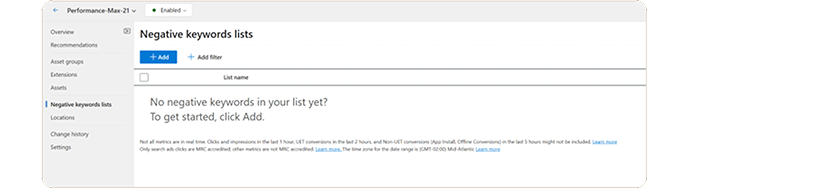
You can now add, modify, or delete negative keywords just like you can with other campaigns, and via negative keyword lists. Negative match types will behave the same for PMax as they do for traditional Search campaigns. Negative keyword lists can be applied at the campaign or account level, and the limit is 5000 negative keywords per list. You’ll need to either add the negatives to existing lists or create new lists.
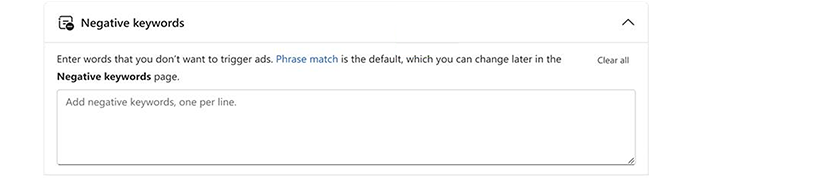
Support for API, Editor, and importing negative keywords from Google Ads are also now available as of March. Finally, note that negative keywords currently only apply to Search and Shopping inventory in PMax.
Simplify your campaign management with streamlined bid strategies
Microsoft Advertising is making automated bidding easier to set up and manage by streamlining bid strategy choices. These options provide an alternative way to express the same optimization goals you already use today—without changing how your campaigns perform.
Going forward, Target CPA (tCPA) and Target ROAS (tROAS) will be available as optional target settings within the following existing strategies:
- For conversion-focused campaigns: Choose Maximize Conversions and optionally set a tCPA.
- For value-focused campaigns: Choose Maximize Conversion Value and optionally set a tROAS.
We first announced this change last summer, but this update is now available globally to all advertisers. This change only applies to newly created campaigns and the bidding strategies will behave and perform the exact same way as they did before.
What isn't changing:
If you have existing campaigns currently using tCPA or tROAS, they will continue to run and optimize as usual with no required action.
Portfolio bid strategies remain unchanged, and you can continue creating and managing them as before using tCPA or tROAS bid strategies.
This update is part of our commitment to delivering advertising tools that work harder for you, with less complexity and more focus on your goals.
Easily identify and resolve issues with your Lodging campaign feeds
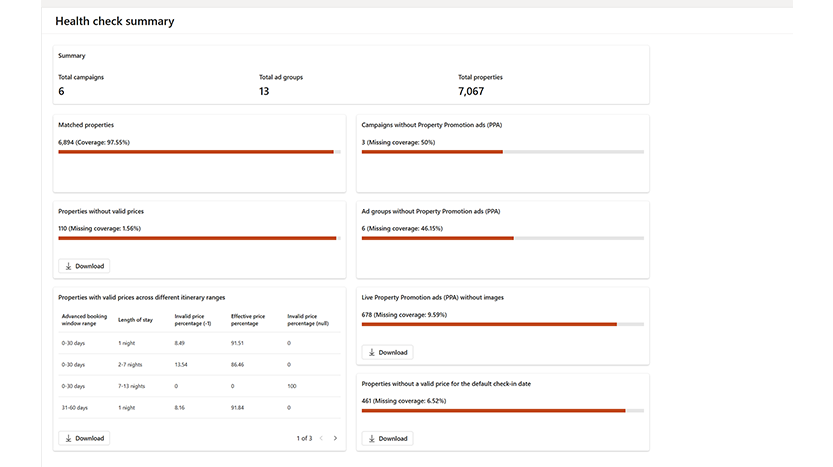
Finally, Health check diagnostics in Property Center are now generally available for all.
These help advertisers quickly identify and resolve issues that prevent their Lodging campaigns (Property Promotion Ads (PPA) and Hotel Price Ads (HPA)) from serving correctly - such as missing or invalid prices, images, and more. In addition to high-level summaries, advertisers can download detailed reports to view granular information and take targeted action. To view the Health check's diagnostics, go to Tools > Property Center > Health check summary – and review more details here.
Help us keep improving your experience
That's all for this month's updates. We’re continuing to invest in automation that drives efficient performance while giving advertisers the transparency and control they need to manage campaigns. Stay tuned for more upcoming updates on how we’re continually working to empower advertisers such as with transparency on landing page reporting for Performance Max and additional diagnostics to troubleshoot campaigns.
We’ll see you back here in April with another recap of what’s to come in Microsoft Advertising. In the meantime, your comments and feedback are integral to shaping and improving our product. You can use the Microsoft Advertising feedback portal, in-product feedback, X (Twitter), Instagram, or as always, contact Support.

Your input makes us better
Take our quick 3-minute survey and help us transform your website experience.