Blog post
AI Max for Search and other product news for August 2026

Welcome back to another edition of the Microsoft Advertising product roundup. Earlier this month, we announced our playbook to prepare for the age of AI shopping, as well as how you can optimize your AI presence with Microsoft Clarity—don’t forget to join our August 27 webinar to dive in further! Today, we’re focusing on the latest updates that help advertisers on the Microsoft Advertising platform reimagine their search campaigns for the AI era, integrate them into their own AI workflows, and better manage accounts, assets, and targeting.
Here are this month’s updates:
This month’s top story: Reimagine Search campaigns for the AI era with AI Max
Did you hear? AI Max is here! This optional suite of Search campaign features is now generally available and helps you understand intent, adapt to emerging queries, and help you show up in the moments decisions are being made. Learn more about these features and the success advertisers are already seeing with AI Max at the August 27 announcement here.

Bring Microsoft Advertising into the AI workflows you already use
You already use AI assistants every day to brainstorm ideas, build campaigns, and optimize performance. But are you still exporting reports, copying campaign data, and switching between tabs just to get AI-powered recommendations? The Microsoft Advertising Model Context Protocol (MCP) server helps eliminate those time-consuming steps by securely connecting the live Microsoft Advertising data to AI assistants, including Microsoft 365 Copilot, ChatGPT, Claude, and more. Through natural language conversations, you can run reports, campaign audits, keyword research, and unlock AI-driven insights without leaving your preferred AI experience. This way, you spend less time managing tabs and moving data, and more time acting on insights.
AI-native marketing teams and agencies are already proving what's possible with our MCP server. Stagwell Media Platform combines Microsoft 365 Copilot, Microsoft Advertising MCP, and Azure AI Foundry to reduce campaign audit timelines from hours to minutes, while creating a scalable foundation for AI-driven marketing workflows. Conversios, an APAC-based agency, built a Performance Max campaign audit dashboard using the Microsoft Advertising MCP server with zero lift from its core engineering team. This dashboard helps evaluate campaign health, Universal Event Tracking (UET) and conversion goals, Merchant Center readiness, and audience signals across more than 120 accounts at scale. Meanwhile, the team at Realtor.com brings Microsoft Advertising data directly into Claude-based agentic workflows, turning competitive keyword insights into campaign optimization strategies in seconds, while keeping human reviewers in the loop before everything goes live.
From campaign audits to agentic marketing workflows, the Microsoft Advertising MCP server helps you and your team bring Microsoft Advertising into the AI experiences you use every day. The server is now available with read-only access through open flight, with public setup guidance and resources available to help you get started.
Strengthen account security with new Dual-ID account linking requirements
Advertisers and agencies managing multiple advertising accounts often link accounts to streamline access and campaign operations. To better protect advertisers from fraudulent linking and unauthorized access, Microsoft Advertising is introducing a new Dual-ID requirement for account linking. When creating a new link request, advertisers will be required to provide two identifiers instead of one, adding an extra layer of verification while keeping the process simple.
- For Manager account linking (CID), advertisers must provide a Manager Account Number + Manager Account ID.
- For Account linking (XID), advertisers must provide a Manager Account Number + Account Number.
For advertisers using the Microsoft Advertising platform, this update applies only to new account linking requests and will be generally available by the end of August. No technical or integration changes are required. Learn more on our Help Page.
For advertisers using the Microsoft Advertising API, account-linking API calls must be updated to include both required identifiers by August 26. Enforcement will roll out beginning August 26 through September 22. Review the ClientLink API requirements for additional details.
Ad Preview Hub extends to Performance Max
Earlier this year, we introduced the Ad Preview hub for Audience ads, bringing a centralized destination for advertisers to preview, validate, and share ad experiences before launch. Now, this same experience is generally available globally for Performance Max campaigns.
Ad Preview Hub helps marketers see exactly how their ads may appear across placements, formats, and devices, making it easier to launch with confidence and avoid surprises. It also enables teams to quickly review headlines, descriptions, images, logos, and videos together to identify creative gaps or formatting issues before they impact performance. And with shareable, view-only links, advertisers can streamline collaboration and approvals by easily sharing ad previews with stakeholders outside the Microsoft Advertising platform. Available today for both Performance Max and Audience ads, Ad Preview Hub helps advertisers move from campaign creation to launch faster and with greater confidence.
Other Performance Max updates: Uplift experiments, search term reporting and age and gender targeting
In the world of Performance Max, we’re also continuing to roll out features to help provide advertisers more transparency, testing capabilities, and targeting that gives advertisers the confidence that it’s working. We’ve rolled out three exciting new updates to help do just that:
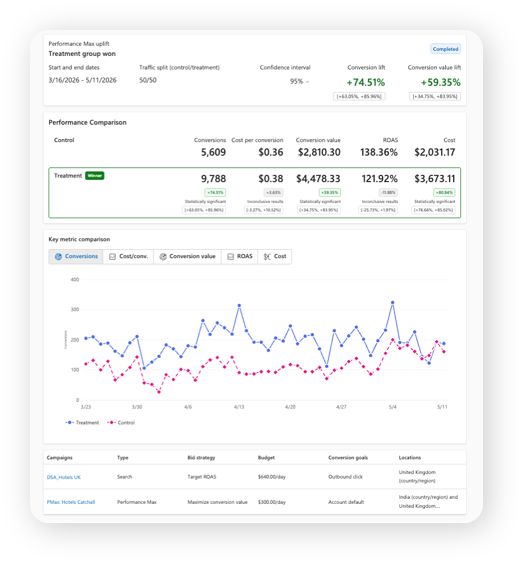
- Uplift experiments (below) help you measure the conversion or conversion value uplift that Performance Max campaigns can provide when added as a complement to your other campaigns types (like search, shopping, or Audience ads). This helps you see the impact of your PMax campaign when run next to your comparable non-PMax campaigns, to help you make decisions on scaling, consolidation, or budget reallocation. For more information, see information on Uplift experiments and upgrade experiments (in pilot) in our help center.
- Search term reporting: while advertisers were already able to see their search terms within the “search term insights” report, it wasn’t always easily discoverable. Now, it’s available in both that report and “search term,” making it far easier for advertisers to leverage, especially for cross-account reports.
- Age and gender targeting: For advertisers that want to limit their PMax delivery to certain demographics, age and gender targeting exclusions are now available. You can now explicitly include or exclude age brackets (e.g., 18-24, 25-34) and gender groups (Male, Female, Unknown), just like with other campaign types. This is rolling out to many advertisers now and will be generally available by next week on September 8.
Recover disapproved assets faster
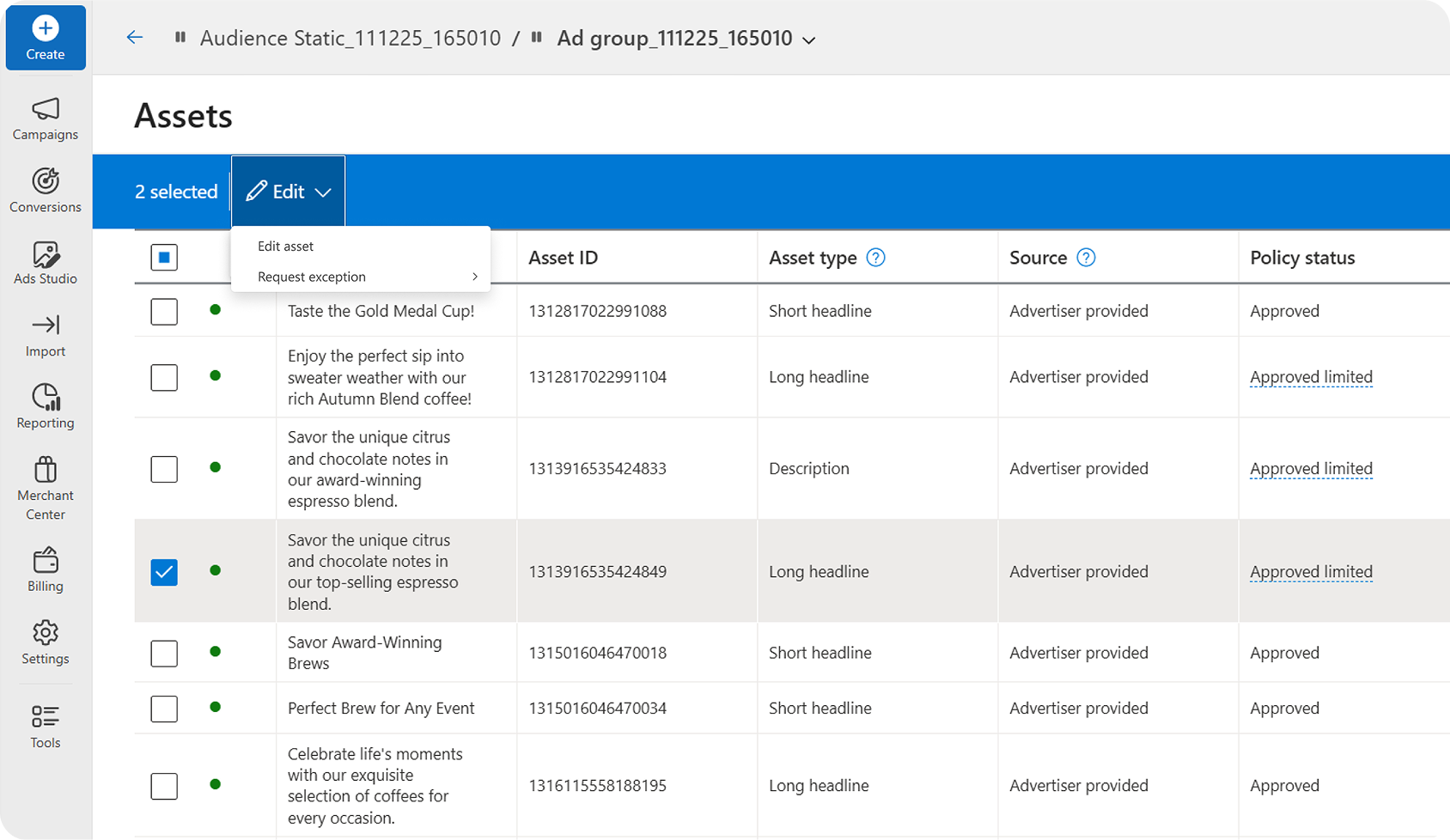
When assets are disapproved or limited by policy, the issue isn't always obvious. Advertisers often have to dig through individual ads to identify which assets are impacted, allowing delivery issues to go unnoticed and campaign performance to suffer. Now, advertisers can view asset policy status directly in the Assets tab, making it easy to identify disapproved or policy-limited text and image assets across campaigns. With the ability to filter by status, see editorial rejection reasons, and edit or appeal multiple assets at once, teams can resolve issues faster, minimize campaign downtime, and keep campaigns delivering smoothly.
Enhanced LinkedIn targeting with Job Seniority
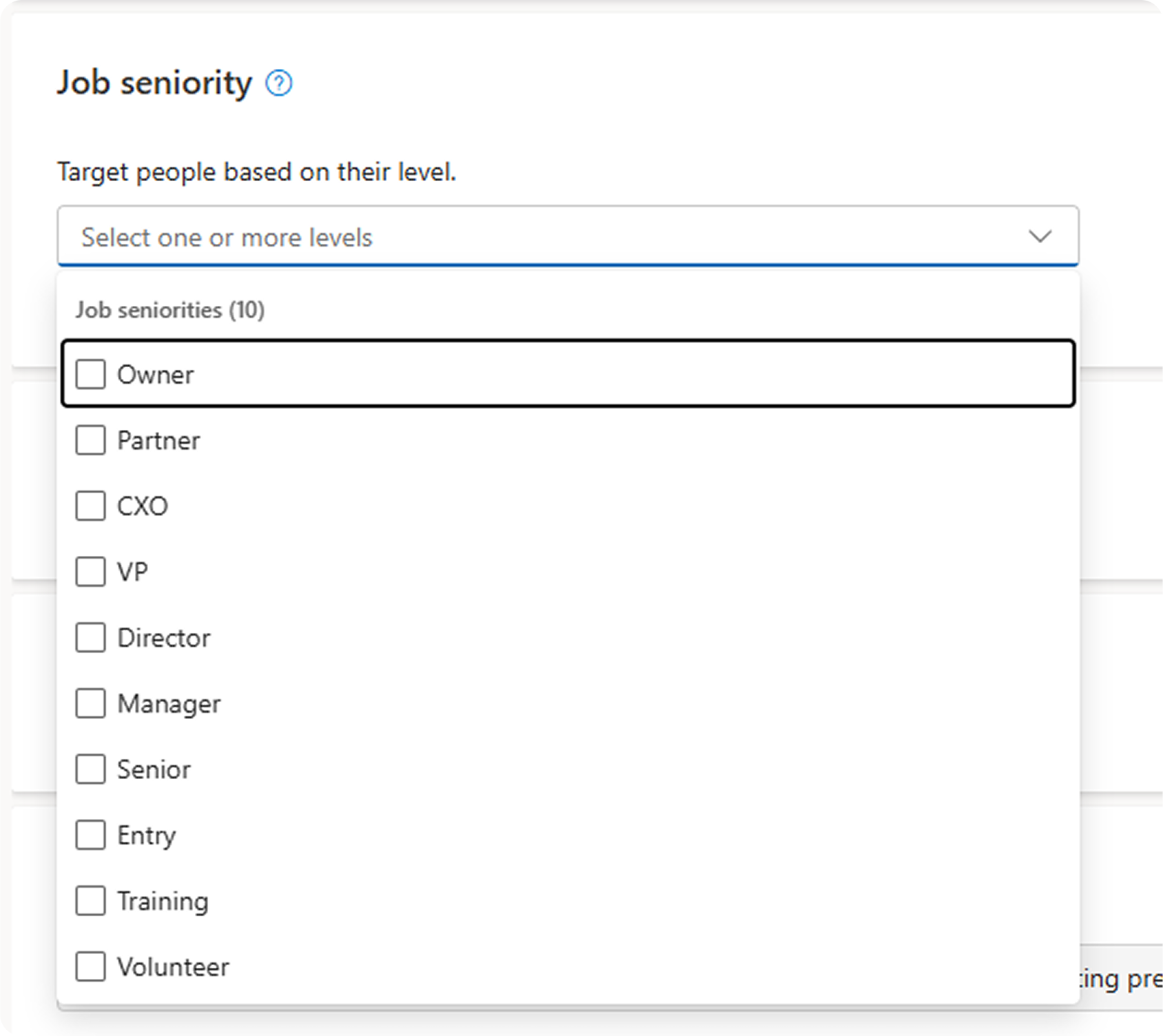
In the world of targeting, LinkedIn profile targeting just got more powerful with the addition of Job Seniority, now generally available for Audience ads and Search campaigns. This new targeting attribute enables advertisers to reach professional audiences based on 10 standardized seniority levels, including CXO, VP, Director, Manager, Senior, Entry, Owner, Partner, Training, and Volunteer. By adding another layer of professional insight to existing LinkedIn targeting capabilities such as company, industry, and job function, advertisers can build more precise audience strategies and connect with decision-makers and influential professionals across the customer journey.
Easily evaluate performance campaigns with average target metrics
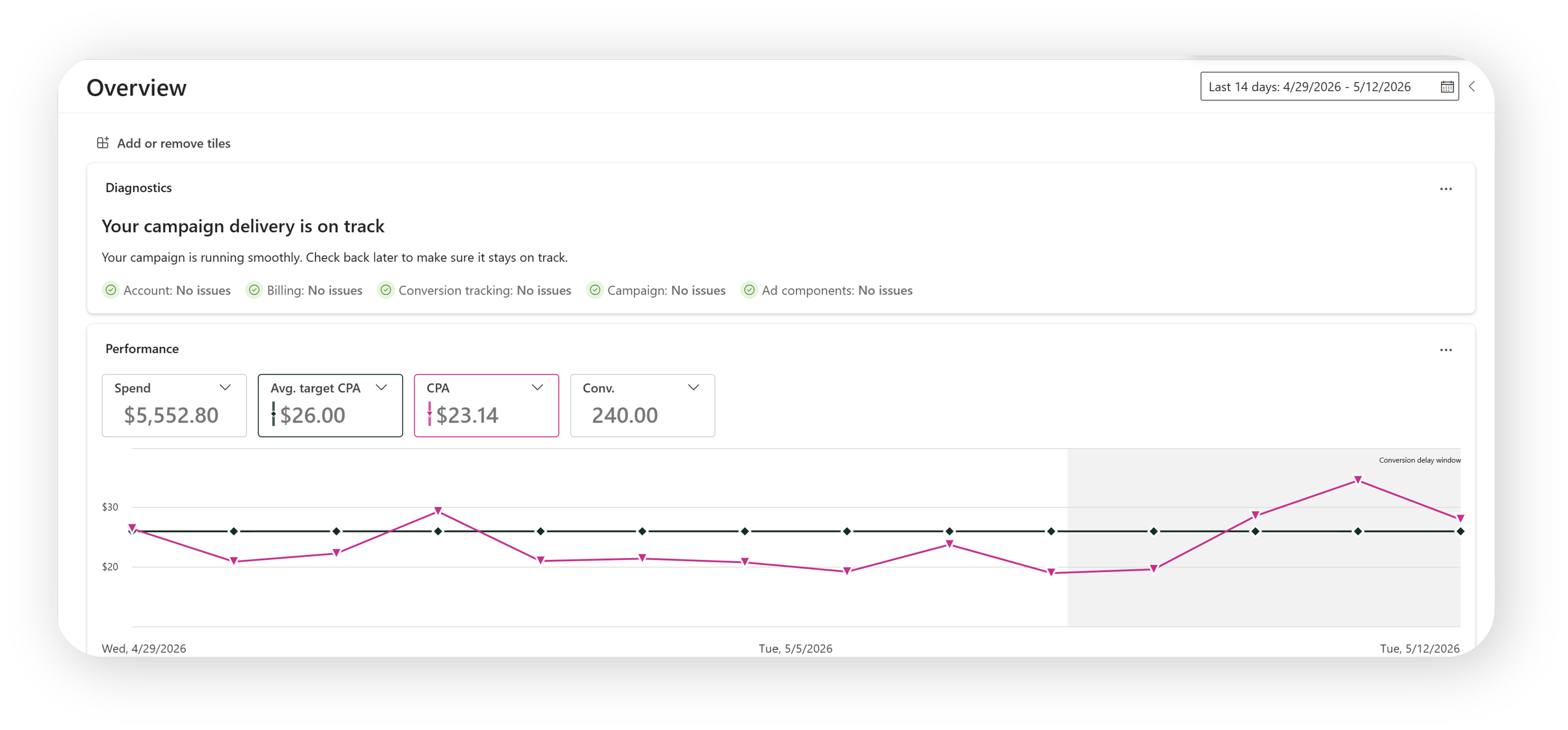
For automated bidding, we’re now making it easier to evaluate performance of your campaign against changing targets over a period of time. This is through new average target metrics, which are now added to the Campaign overview (below), Campaign grid, and within portfolio bid strategies.
Improving performance: Updates to Max CPC for new campaigns
Providing the right signals and levers to campaigns to guide bid strategy optimization is one of the many important responsibilities for advertisers to help deliver the best outcomes. In our platform, we see that when advertisers set a Maximum CPC, which overrides advertisers’ own CPA/ROAS targets, this provides conflicting instructions to the system and causes advertisers to miss their overall desired outcomes, even when the cap is above average CPC. Rather than relying on CPC caps, it’s better to manage performance through the controls most directly tied to outcomes: budgets, target CPA, target ROAS, conversion value rules, and seasonality adjustments (where appropriate).
This is why, starting October 1, the Max CPC setting will no longer be available when creating new non-portfolio campaigns using Maximize Conversions (with Target CPA), Maximize Conversion Value (with Target ROAS), or Maximize Clicks. Existing campaigns created before October 1, 2026, that already use Max CPC will keep the setting, and Max CPC will remain available for new and existing campaigns using portfolio bid strategies. We encourage you to leverage experiments to see the impact of removing Max CPC, and manage performance through budgets, targets, conversion value rules, and seasonality adjustments.
Lastly, Microsoft Advertising’s bidding continues to allow campaigns to over-achieve on target CPA or target ROAS efficiency, regardless of budget limited status. On our platform, targets are not rigid values that must be met at the expense of potentially better available ROI, but rather as directional levers to help the system balance volume and efficiency. Continue to leverage budgets and target changes and conversion value rules to steer your campaign, and Microsoft Advertising will continue to maximize efficiency, even when budget constrained.
Help us keep improving your experience
We’re continuing to invest in innovations that make it easier to manage campaigns and improve your performance. We’ll see you back here in September with another recap, and stay tuned for more exciting updates coming soon.
In the meantime, your comments and feedback are integral to shaping and improving our products. You can use the Microsoft Advertising feedback portal, in-product feedback, X (Twitter), Instagram, or as always, contact Support.

Your input makes us better
Take our quick 3-minute survey and help us transform your website experience.