Blog post
Publisher Release Roundup: Copilot in Monetize gets an upgrade
![Promotional image for Microsoft Monetize featuring the Microsoft logo with the text "Microsoft Monetize" on a light blue background. On the right, a white panel displays the Copilot AI chat interface with the heading "Ask Copilot in Microsoft Monetize to help with:" followed by three suggested prompts: "What is a Guaranteed Delivery Line Item?", "Show me my top 5 placements by revenue in the last week", and "Performance for line item [name or id]". Below, a conversation is shown where the user asked "Show me my top 5 placements by revenue in the last week." The assistant's response includes visible processing steps — checking report types, checking report fields, and running the report — followed by a populated table titled "Here are the top 5 placements ranked by revenue for the last 7 days."](/content/dam/sites/msa-about/global/common/content-lib/blogs/blog/2026/07/new-blog-87005-heronew-844x315.png)
Refreshed Copilot in Monetize experience fuels expert-level account answers via natural language prompts
AI is quickly changing how publishers and their teams manage monetization workflows. What used to require a human moving between multiple reports, line item screens, change logs, and forecasting tools can now begin with a simple question. With the expansion of Copilot in Microsoft Monetize, powered by our Model Context Protocol (MCP) server foundation, we’re making that shift practical for day-to-day publisher operations.
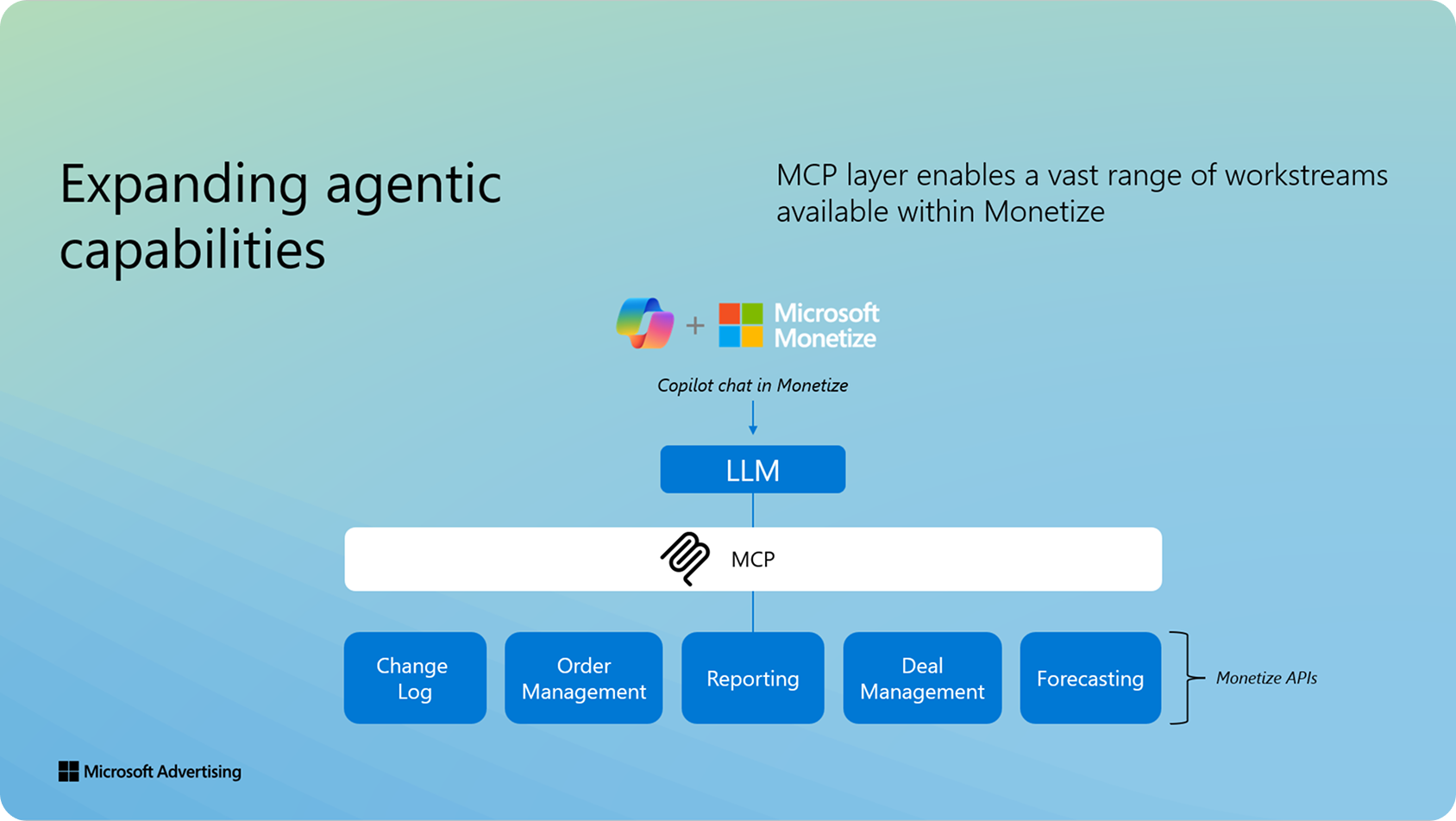
Since April 2025, Copilot has already helped users navigate the platform, understand key concepts, and find relevant documentation. Today we’re excited to announce that Copilot’s new MCP-backed capabilities, now in open beta for both Monetize and Curate, help publishers do more by grounding responses in their Monetize account data. Instead of manually building reports or jumping across screens, users can ask natural-language questions such as “Show me revenue on deals created last week” or “Tell me why this deal isn’t spending,” and get relevant, data-driven insights directly within the platform.
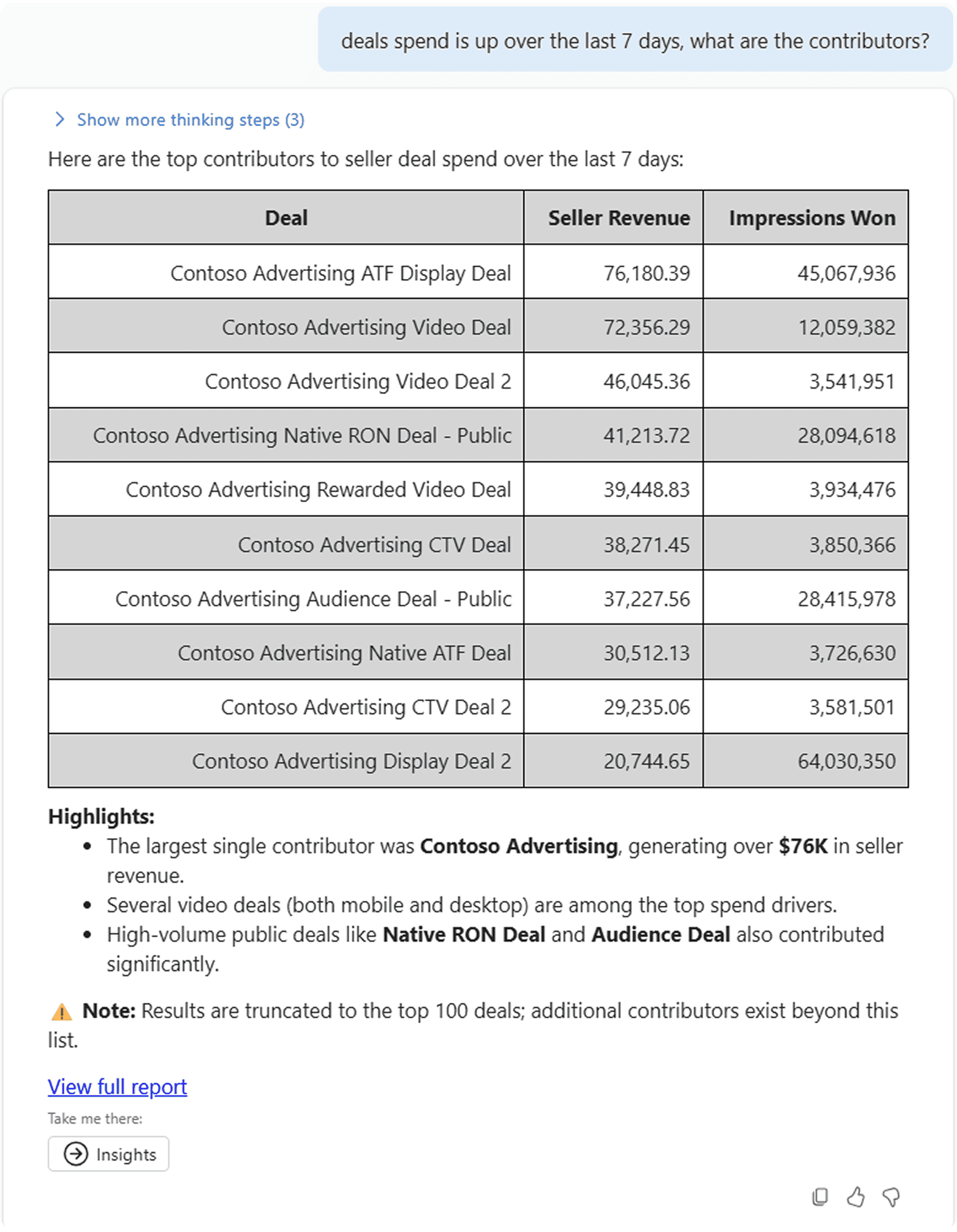
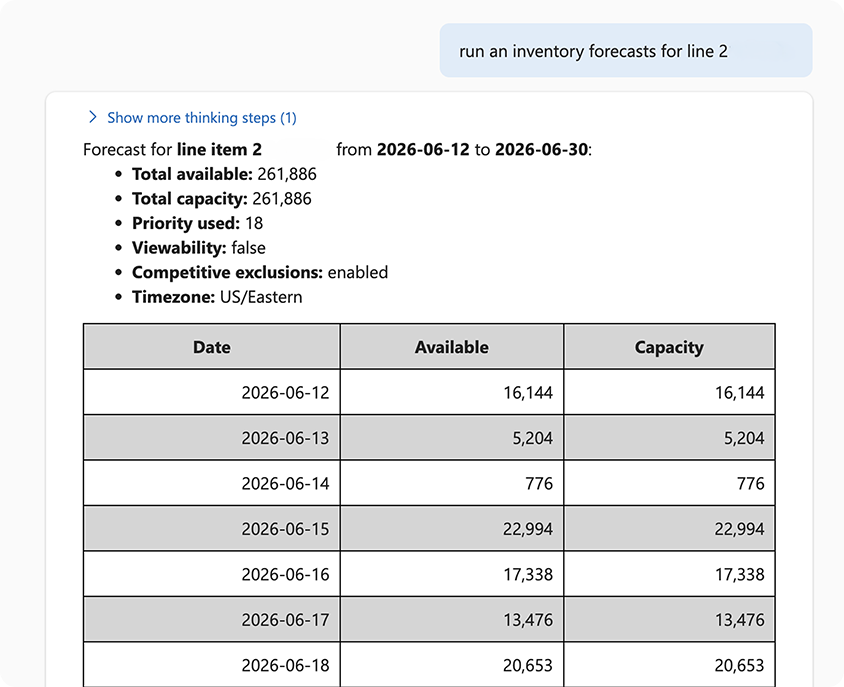
This expansion is designed to reduce operational friction across common Monetize workflows. Publishers can use Copilot to query platform data across areas such as deals, line items, reporting, inventory, and change history; generate structured summaries; and diagnose issues more quickly. For Ad Server clients, inventory forecasting can also be accessed through Copilot via the MCP connection, helping teams run forecasts for line items or general inventory without navigating through multiple manual steps.
Use cases include:
- Data and insights: Ask questions about reporting, revenue, delivery, and performance without manually assembling reports.
- Troubleshooting: Diagnose why deals or other key revenue drivers may not be spending and surface recommended next steps.
- Object management and discovery: Retrieve structured information about line items, insertion orders, placements, deals, ad quality settings, and other Monetize objects.
- Inventory discovery: Explore supply recommendations based on business goals, RFP context, or natural-language prompts.
- Forecasting: Access selected forecasting data for guaranteed delivery and programmatic guaranteed workflows where enabled.
Security and access controls remain central to the experience, as Copilot only exposes information the signed-in user already has permission to access from their Monetize member seat. Rate limits are also enforced at the MCP and API layers to help maintain platform performance.
For publishers, the benefit is simple: less time navigating, more time acting. Copilot in Monetize brings expert-level answers closer to where work happens, helping teams move from question to insight faster and operate with greater confidence. Click the Copilot icon in your Monetize or Curate account to get started.
Your comments and feedback are integral to shape and improve our product. If you have questions use the Microsoft Advertising feedback portal, X (Twitter), Instagram, or, as always, contact Support.

Your input makes us better
Take our quick 3-minute survey and help us transform your website experience.