Blog post
Publisher release roundup: Q1 2026 edition

As we’ve moved into spring and beyond the early days of 2026, Microsoft Monetize is shaking off the frost with a handful of thoughtful updates. While this release is lighter on brand-new features, we’ve focused on delivering practical improvements across usability, deals, and ad quality—and we’re gearing up for some bigger moments later this year.
Here’s a roundup of what’s new for Microsoft Monetize.
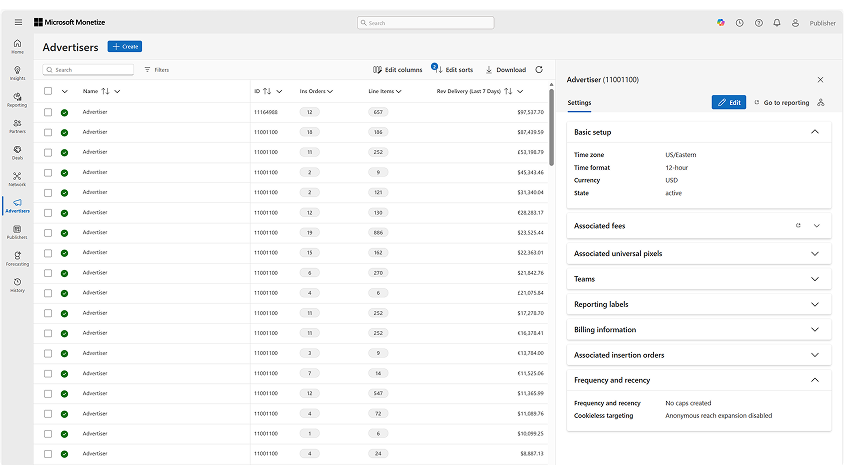
Updated monitoring screens for Advertisers, Orders, Line Items, and Inventory Manager
Microsoft Monetize has modernized the Seller Monitoring Workflow (SMW) by migrating the user interface to Fluent UI across Advertiser, Insertion Order, Line Item, and Inventory Manager screens. This update improves accessibility, aligns Monetize with Microsoft-wide UI standards, and lays the foundation for future enhancements.
- Improved accessibility, including:
- Enhanced keyboard navigation
- Improved screen reader support
- Modernized table layout with clearer hierarchy and spacing
- Users can continue managing inventory and delivery without workflow disruption
Multi-Buyer Deals with DV360 Central Partner ID
Multi Buyer Deals with DV360 allow publishers to make a single deal available to multiple DV360 buyers by targeting a DV360 Central Partner ID, instead of an individual buyer seat. This enables one deal to be accessed and bid on by all buyers grouped under the same DV360 partner umbrella, simplifying deal setup and expanding buyer reach without duplication.
- You can now create a single deal that is automatically eligible for all DV360 Partner IDs associated with a selected Central Partner ID.
- Deal permissions are managed directly within Display & Video 360 (DV360), eliminating the need for manual buyer seat listing.
- Supports DV360’s latest buying standards for agency and buying-group deal execution.
Deal Sync Status available in the new Deals screen
Deal Sync Status is now available in the new Deal screen, providing sellers with visibility into whether a deal has successfully synchronized with supported DSPs, including Display & Video 360 and The Trade Desk.
Sellers can view the sync status under the Buyer column in the Deal screen. For single-buyer deals, the status appears directly in the grid, while for multi-buyer deals, buyer-specific details are available in the Settings side pane.
Modeled Audiences: Max Reach (Microsoft Curate)
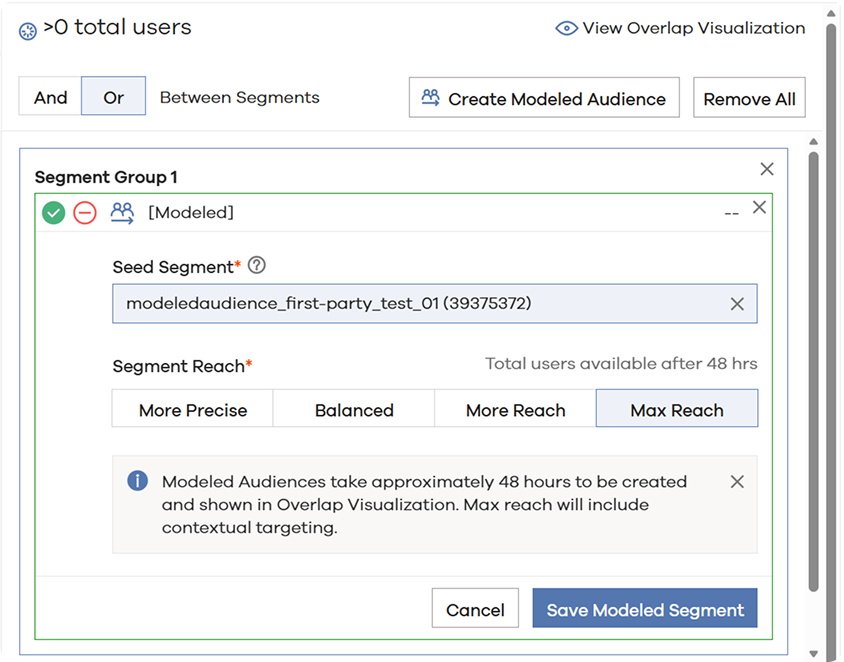
Curators can now use the Max Reach option to expand their first-party segments to similar users for targeting.
Max Reach introduces contextual expansion, allowing curators to extend beyond addressable user IDs. In addition to targeting modeled users, Max Reach leverages Microsoft first-party data and large language models (LLMs) to identify relevant URLs, apps, and contextual environments that align with the seed segment’s characteristics.
Additional reporting dimensions for GPID and SCHAIN
New reporting fields for Global Placement ID (GPID) and Supply Chain (SCHAIN) have been added to Historical Reporting in Microsoft Monetize, allowing publishers to analyze supply chain object attributes and determine whether a GPID was present on impressions. These fields are available in both the Monetize reporting UI and the Digital Platform API.
Ad Quality: Enhanced Bidder Blocks UI
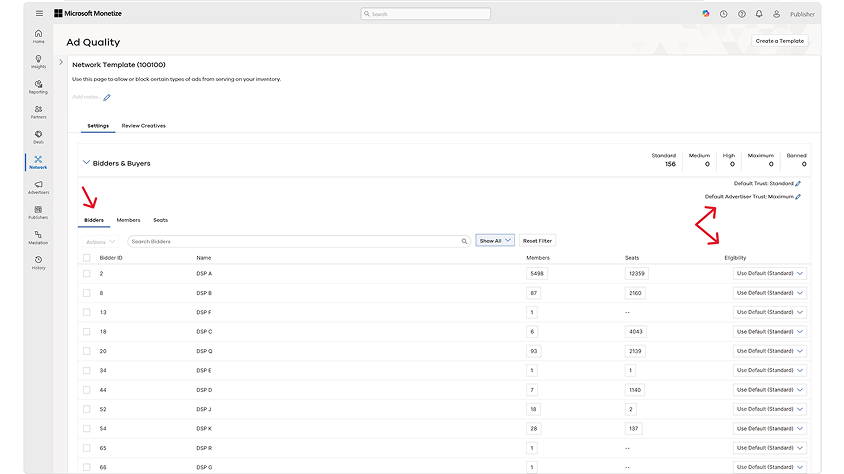
Benefit from a unified hierarchy and improved visibility. The new UI now displays a clear hierarchy: Bidder → Member → Seat, making it easier to understand and manage your trust settings and see each bidder’s transition status. You can now set trust levels at the bidder level, with the option to override at the member or seat level for more granular control.
And that's a wrap! We’ll see you back here at the end of Q2 with another recap of what’s to come. In the meantime, your comments and feedback are integral to shaping and improving our product. You can use the Microsoft Advertising feedback portal, in-product feedback, X (Twitter), Instagram, or as always, contact Support.

Your input makes us better
Take our quick 3-minute survey and help us transform your website experience.