Blog post
Performance Max updates and other product news for January 2026

Welcome to 2026! We’re back with another Microsoft Advertising product roundup, built to give search-first marketers the latest and greatest updates for the platform and learn about new capabilities to take advantage of now and to look forward to in the future.
For our latest updates, we’re focused on bringing you more controls, transparency, and making our products generally easier to use. Let’s dive in...
Performance Max: New customer acquisition goals
It’s a new year, time to drive new customers for your business! With Performance Max’s new customer acquisition feature, you can enable specific targeting of new customers for your business, with options to either increase bids for new customers or focus exclusively on acquiring them.
This is available in open beta for advertisers using purchase goals and allows you to bring in net-new customer revenue along with your existing Performance Max (PMax) campaigns.
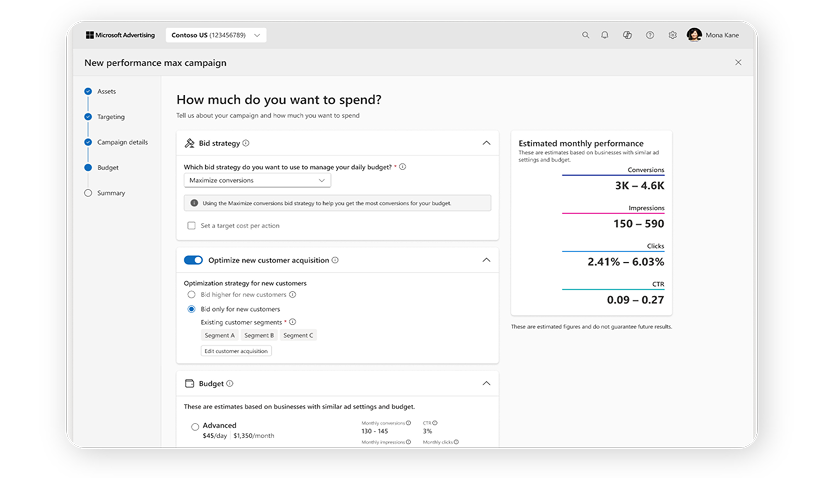
Best practices: When you set up a Performance Max campaign for new customer acquisition, make sure you’re setting a conversion value for new customers (ideally at least 30% of the average revenue you see from a usual sale) and uploading and refreshing your audience lists as often as you can (daily or weekly). More details on setup are available here.
PMax: More transparency, controls, and platform improvements
We’re continually working on bringing more transparency and controls to you within PMax as well, specifically with...
- Share of voice (SOV) metrics: This includes impression share, click share, impression share lost to budget, and impression share lost to rank. This data is available as far back as November 10. Note that these metrics are an aggregate of impression from search and shopping placements; audience placements aren't included or counted in this report.
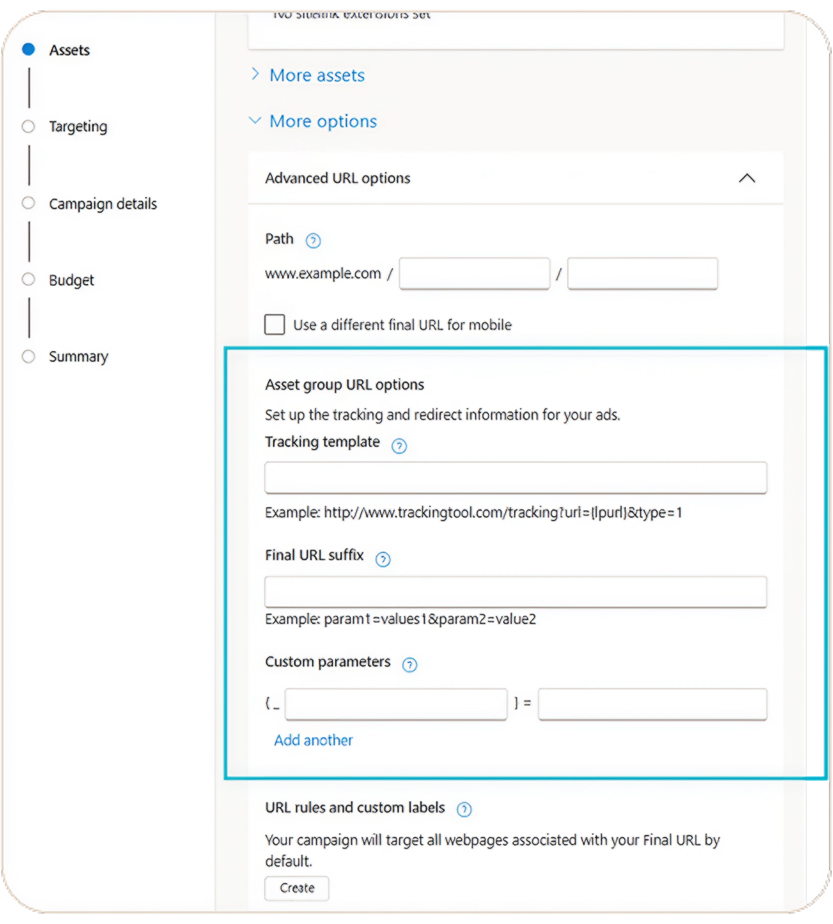
- Asset group-level URL options and tracking templates: Within PMax asset groups, advertisers can now submit tracking parameters and custom parameters to split up data at the asset group level. This takes the existing URL options/tracking parameters level from the campaign/ad-group level and makes it available for PMax.
Finally, two other important updates are designed to make your PMax campaign imports even more efficient on the Microsoft Advertising Platform:
- Increased Search Theme Limit: Our PMax campaigns now allow up to 50 search themes, doubling the previous limit. This also means all your search themes will be included in your import, helping your campaigns benefit from richer and more comprehensive signals.
- Enhanced Asset Group Import: If your asset group contains images that don’t meet the size requirements, exceed the previous 25-image limit, or include auto-generated logos, the rest of your asset group will still be imported. This means you’ll retain all eligible assets, minimizing any disruption to your campaign imports.
These updates are designed to reduce friction during the import process and make it easier for you to optimize your PMax campaigns and assets across platforms. Learn more about Google Import for PMax here.
Audience ads: Content Targeting now generally available
In the world of Audience ads, Content Targeting is now generally available, giving you new ways to reach customers in contextually relevant environments across Microsoft properties and select partner sites.
You can choose from two targeting options...
Placement targeting: Serve ads exclusively on premium Microsoft properties like MSN, Outlook, Microsoft Casual Games, and Microsoft Edge.
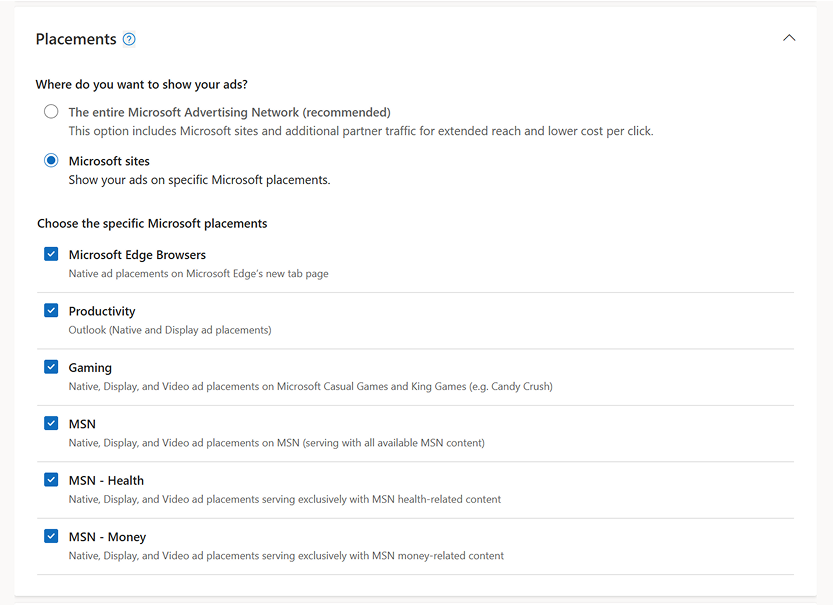
Topic targeting: Align ads with specific content categories—such as Finance, Travel, Health and more—to ensure messages appear alongside relevant, high‑quality content.

By matching ads to what users are actively consuming, you can increase engagement, strengthen brand alignment, and improve performance.
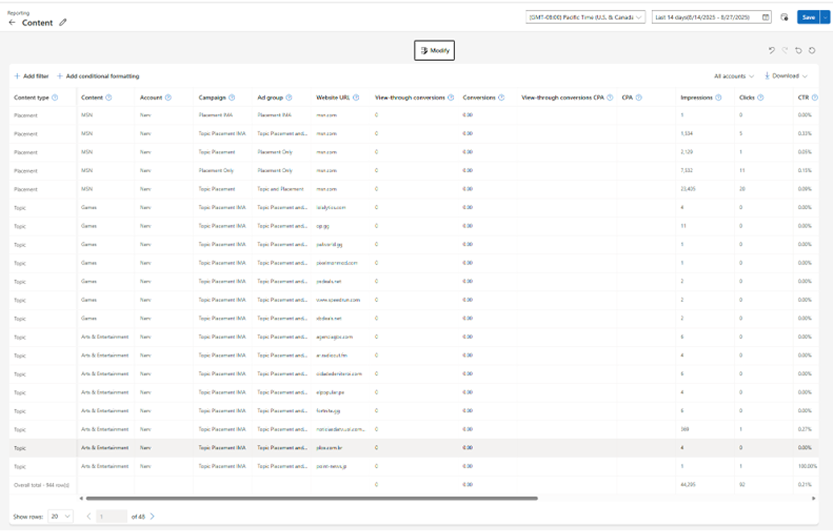
With this launch, we’ve also released a content targeting report, allowing you to better understand where your ads are served across content categories and Microsoft properties, and use those insights to optimize future campaigns.
Location targeting improvements
We’ve expanded and improved location targeting across Microsoft Advertising to make setup smoother and more accurate. You’ll benefit from broader location coverage, more reliable imports from Google, and improved campaign activation with fewer imports remaining paused or inactive. It’s a small, but meaningful enhancement for anyone managing geotargeted campaigns.
Autogenerated assets in Responsive Search ads
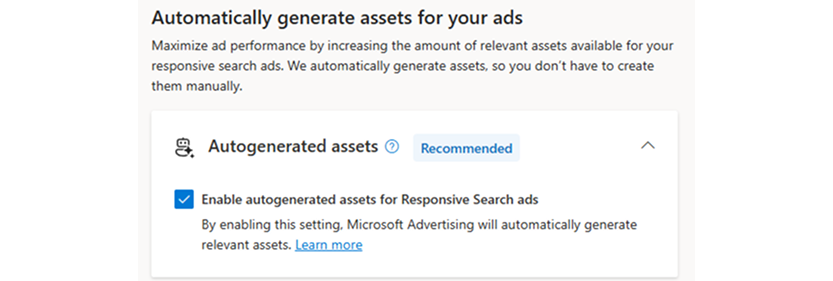
Starting today, we begin rolling out Autogenerated assets as an automatically enabled feature when you create new Responsive Search ads (RSA) for users globally, excluding China and South Korea.
What's the benefit?
- Create more relevant ads. Leverage content from your website to customize assets to your customers.
- Scale your work. Increase the number of ad variations available to complement the RSA headlines and descriptions you’ve already created.
- Improve performance. Advertisers who enable autogenerated assets in RSA are seeing 5% increase in click-through rate.
How does it work?
Auto-generated assets maximize your asset variety by creating additional text assets for your RSAs if you have not provided all the available text fields (15 headlines, 4 descriptions). Over time, autogenerated assets will maximize your RSA performance by continually generating, testing, and optimizing your text assets.
However, if you have already provided the maximum text assets, autogenerated assets will not generate any additional assets.
What’s not changing?
- Advertisers in sensitive verticals – Auto-generated assets in RSA will remain an opt-in feature for advertisers in the following verticals: Adult, Autos, Financial Services, Gambling, Government, Health Information, Health Services, Insurance, Legal Services, Pharmaceuticals, Travel, and Community, Social, & Charitable.
- Existing Responsive Search ads – This will not retroactively change any of your existing RSAs to enable auto-generated assets.
- Imported Responsive Search ads – Microsoft Advertising will honor the settings you chose for auto-generated assets on other platforms when an RSA is imported.
- Image extensions – Autogenerated assets in RSAs only apply to text assets.
How to opt out?
- When creating a new RSA, uncheck the Enable auto-generated assets option.
- For any existing campaigns, go to your Campaign tab > apply a checkmark next to campaigns you want to edit > Click Edit dropdown menu > Click Edit auto-generated assets settings.
How to view and delete assets that are autogenerated?
- Go to your Campaign tab > Assets sub-tab > Use the Source column to see which are auto-generated assets > Apply a checkmark next to any assets you want to remove.
Help us keep improving your experience
That's all for this month's updates. We’ll see you back here in February with another recap of what’s to come in Microsoft Advertising.
In the meantime, your comments and feedback are integral to shaping and improving our product. You can use the Microsoft Advertising feedback portal, in-product feedback, X (Twitter), Instagram, or as always, contact Support.

Your input makes us better
Take our quick 3-minute survey and help us transform your website experience.